How to install mods manually
Plenty of mods still come as "copy these files into your game folder". It's simple once you know the three things that go wrong: the wrong folder level, a missing requirement, and no way back. This guide covers all three, for any PC game.
Which mods you install by hand
- Replacers overwrite files the game already has: textures, models, sounds, UI. These are the ones that need a backup.
- Add-ons drop new files into a mods folder, like
Mods,archive/pc/modorBepInEx/plugins. Nothing is overwritten, but you still need to know what you added. - Loaders and script extenders put a
.dllor.exenext to the game's own. Other mods depend on them. - Config tweaks change an
.inior settings file. Keep a copy of the original.
For games with huge mod lists and load orders, like Skyrim and Fallout 4, a mod manager such as Vortex or Mod Organizer 2 is the better fit. For most other games, installing by hand is quicker and you can see exactly what changed.
1. Read the mod page first
Before downloading, check three things: the game version the mod supports, its requirements (other mods or a loader it needs), and the author's install instructions. Most "the mod does nothing" problems are a missing requirement or a game update the mod hasn't caught up with yet.
2. Find the game folder
- Steam: right-click the game, then Manage, then Browse local files.
- GOG Galaxy: open the game, click the settings icon next to Play, then Manage installation, then Show folder.
- Epic Games: in your library, click the three dots on the game, then Manage, then the folder icon next to the install path.
That's the game's root folder. The game's .exe is usually there, but not always: Cyberpunk 2077 keeps it in bin/x64, and Unreal Engine games keep it in GAME/Binaries/Win64. That matters for loaders, which have to sit next to the .exe.
3. Back up what the mod will touch
Open the mod's archive and look at its top-level folders. Those are the folders that will change. Copy them from your game folder to somewhere safe, like a Mod backups folder in Documents. If the mod changes saves or settings, back those up too. They're usually in Documents, Saved Games or AppData, not in the game folder.
On Linux and Steam Deck, rsync can copy the mod in and keep a backup of every file it overwrites at the same time:
rsync -a --backup --suffix=.orig "$HOME/Downloads/CoolMod/Data/" "$HOME/.local/share/Steam/steamapps/common/GAME NAME/Data/"Each file it replaces is kept beside the new one, with .orig on the end.
4. Line the mod up with the game folder
This is the most common mistake. Mods are often packed inside an extra folder named after the mod:
CoolMod_v2.zip
└── CoolMod_v2/
    └── Data/
        └── Textures/
            └── armor.dds
Your game folder already has a Data folder. So the thing to copy is the Data folder from inside CoolMod_v2, dropped into the game folder so it merges with the existing Data. Copy the whole CoolMod_v2 folder instead and the files end up at CoolMod_v2/Data/..., where the game never looks.
The rule: find the folder in the mod that has the same name as a folder in your game, and copy at that level.
On Linux and Steam Deck, check the capitalization too. data/textures and Data/Textures are different folders there, so a mod made on Windows can create a second folder the game ignores. Rename the mod's folders to match the game's. The Steam Deck modding guide covers this in more detail.
5. Copy and replace
Drag the folders into the game folder. When Windows asks, choose "Replace the files in the destination". If the game is installed under C:\Program Files, Windows may ask for administrator permission to change it.
Then write down what you installed: the mod name, the date and the folders it touched. A text file in your backup folder is enough. You'll want it the day you uninstall.
6. Test, then add the next one
Launch the game and check the mod works before installing another. One at a time is slower, but when something breaks you'll know which mod did it.
When a mod doesn't work
- Nothing changed in the game: the files are one folder too deep (step 4), or on Linux the folder capitalization doesn't match.
- The game crashes on launch: a missing requirement, or a mod made for a different game version. Take the mod back out and recheck its page.
- A loader doesn't start: its
.dllmust sit next to the game's.exe. On Steam Deck and Linux it also needs a launch option; see mod loaders on Steam Deck and Linux. - It worked until a game update: updates often break mods and loaders. Wait for updated versions, or take the mods out until they arrive.
- The game wants mods switched on: some games have a mods menu, a plugin list or a launcher setting. The mod page will say.
The checked way: BulkFileReplace
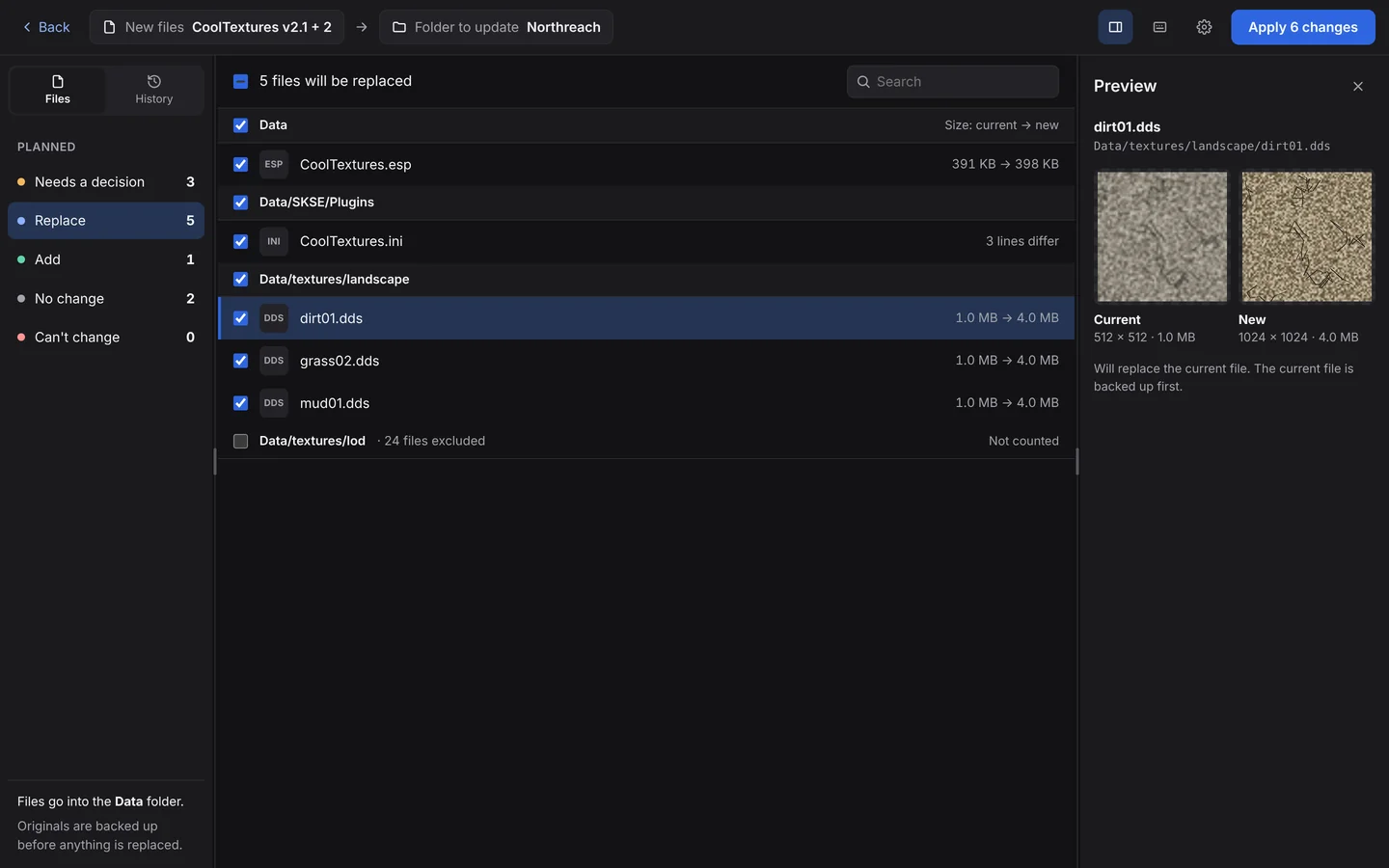
BulkFileReplace does steps 3 to 5 for you, and makes step 6 safe:
- Drop the mod (folder or ZIP) and choose your game folder.
- Check the line-up. It finds the matching level for you (
CoolMod_v2/Data → Data) and shows it in plain words. On Linux it matches folders whatever their capitalization. - Review every change before anything is copied: what will be replaced and what's new, with textures, images and text files previewed side by side.
- Apply. Every original is backed up and checked first.
- Undo any time, from the results or from History. Undo restores the originals and removes the files the mod added.
Questions
Where do mod files go?
Wherever the mod's folders match your game's. Open the mod archive, find the folder with the same name as one in your game folder, and copy at that level. Loaders go next to the game's .exe.
Is it safe to install mods manually?
Yes, if you back up the files the mod replaces and download from trusted sites like Nexus Mods or the game's official mod hub. Be wary of mods that ask you to run an unknown installer.
How do I uninstall a mod I copied in by hand?
Delete the files it added and restore the files it replaced. The guide on uninstalling manually installed mods walks through it. BulkFileReplace does both with one click.
Do I need a mod manager?
Not for most mods. Mod managers are worth it for games with long mod lists and load orders, like Skyrim and Fallout 4.
Your next mod install, with an undo button.
Preview every change, automatic backups, undo any run. $19 once.