How to uninstall manually installed mods
Installing a mod by hand takes a minute. Taking it back out is harder, because nothing kept track of what it changed. Here's how to get back to a clean game without reinstalling everything.
Why it's tricky
A mod does two things: it replaces files the game already had, and it adds new ones. Removing it means undoing both.
Steam's Verify integrity only handles the first. It re-downloads game files that were changed or deleted, but it leaves files the game doesn't know about. Loaders, mod folders and extra files stay where they are, and many keep loading.
1. Back up your saves
Mods can change saves, and some saves won't load cleanly once a mod is gone. Copy your saves somewhere safe first. They're usually in Documents (often Documents/My Games), Saved Games, or AppData. On Steam Deck and Linux, Windows games keep them inside the game's Proton folder: ~/.local/share/Steam/steamapps/compatdata/APP ID/pfx/drive_c/users/steamuser/.
2. Work out what the mod installed
The best list is the mod itself. Download it again if you need to, open the archive, and every file in it is a file to look for in your game folder.
If you've lost track, dates can help:
- Windows: in File Explorer, right-click a column header, add Date created and sort by it. Files a mod added usually show the day you installed it. Date modified is less useful, because copying keeps the mod author's dates. (Files it replaced may keep their old dates; step 4 takes care of those.)
- Linux and Steam Deck: run this in the game folder to list every file changed or added since a date:
find . -type f -newerct "2026-11-01"3. Remove the files the mod added
Delete the mod's own folders and files: loader DLLs next to the game's .exe, folders like BepInEx or Mods, and new files inside the game's folders. If you're unsure about a file, move it into a folder outside the game instead of deleting it, and check the game still runs.
4. Restore the files the mod replaced
Copy your backup back over the game folder. No backup? Have the store re-download the originals:
- Steam: right-click the game, then Properties, then Installed Files, then Verify integrity of game files.
- GOG Galaxy: click the settings icon next to Play, then Manage installation, then Verify / Repair.
- Epic Games: click the three dots on the game, then Manage, then Verify.
Do this after step 3. If you deleted a game file by mistake, verifying puts it back too.
5. Clean up settings
- Launch options: remove lines like
WINEDLLOVERRIDES=...or-moddedfrom the game's Properties in Steam. - Config files: some mods change
.inior settings files in Documents or AppData. Restore your copies, or delete the files and let the game recreate them (this resets your settings). - In-game mod lists: games with a mods menu or plugin list may still try to load the mod. Switch it off there.
6. Test, and keep the backup a while
Launch the game and load a save. Keep your backups until you're sure everything works, and load a save from before the mod if the current one misbehaves.
Common games
- Cyberpunk 2077: mods live in
archive/pc/mod,mods,r6/scripts,r6/tweaks,red4extandbin/x64/plugins, with loader files inbin/x64such asversion.dll,winmm.dllandglobal.ini. Never deletearchive/pc/content. More in where Cyberpunk 2077 mods go. - BepInEx games (Lethal Company, Valheim, Silksong and others): delete the
BepInExfolder,winhttp.dllanddoorstop_config.ini, and remove the launch option. - MelonLoader games: delete
version.dll(anddobby.dllif present), plus theMelonLoader,Mods,Plugins,UserDataandUserLibsfolders.
Last resort: a clean reinstall
Uninstall the game, then check its folder: uninstalling usually leaves behind files the store didn't install, including mods. Delete what's left, then reinstall. Back up your saves first, even if they're synced to the cloud.
Next time: undo in one click
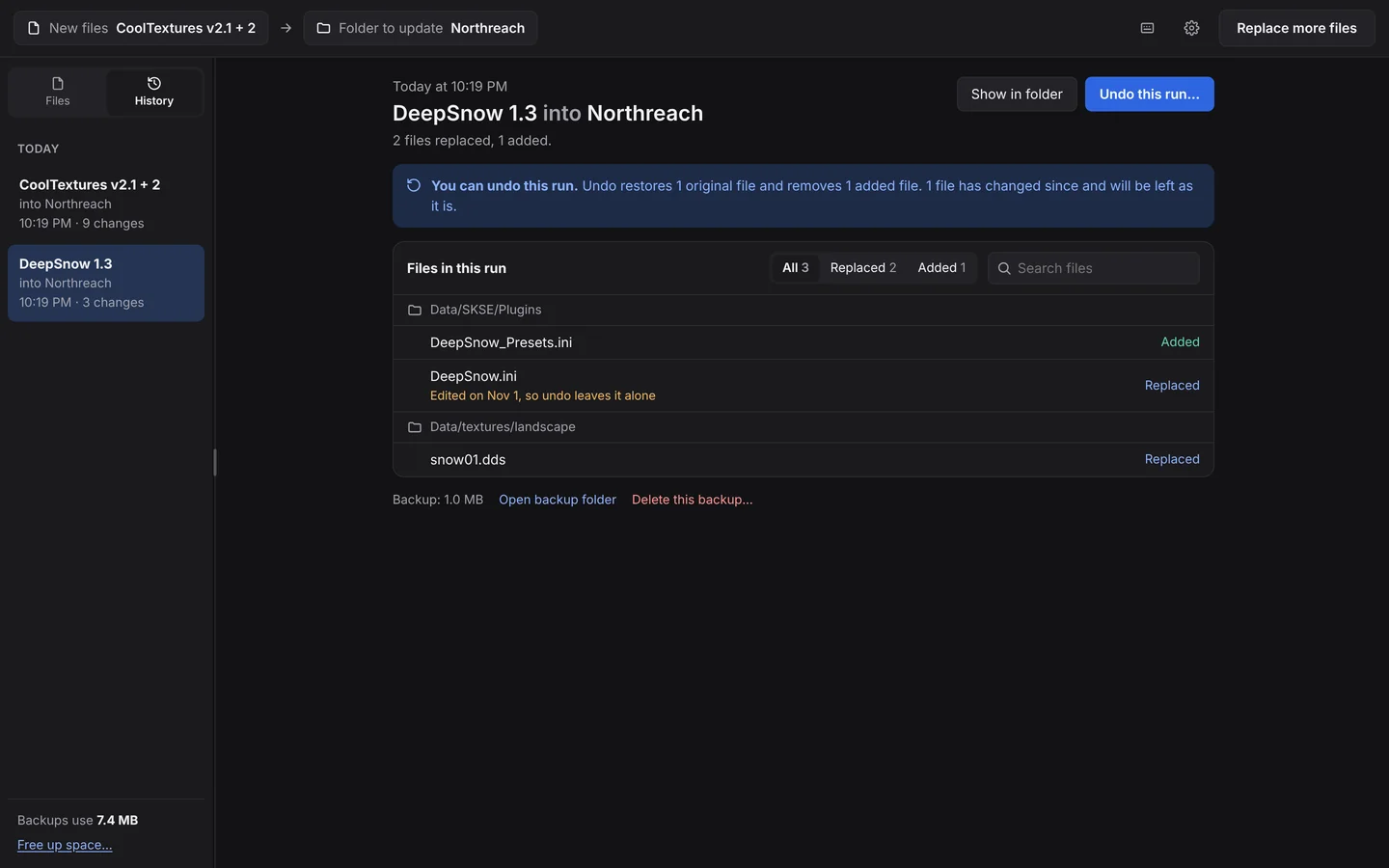
All of this is guesswork because nothing recorded what the mod changed. BulkFileReplace records every run:
- Every original is backed up and checked before it's replaced.
- History lists every run, with every file it replaced and added.
- Undo restores the originals and removes the added files. Files you've changed since are left alone.
Questions
Does Verify integrity remove mods?
Only partly. It restores game files a mod replaced, but it doesn't delete files a mod added, so loaders and mod folders stay.
Does uninstalling a game remove its mods?
Usually not completely. Stores remove the files they installed and often leave everything else, mods included, in the game folder. Check the folder after uninstalling.
Will removing a mod break my save?
It can, if the save depends on something the mod added. Back up your saves first, and load a save from before the mod if the current one has problems.
How do I find which files a mod added?
Open the mod's archive: every file in it is one to remove. On Windows, sorting the game folder by Date created helps. On Linux, find . -type f -newerct DATE lists files changed since a date.
Install mods you can take back out.
Preview every change, automatic backups, undo any run. $19 once.